
By default in WordPress MU, blogs can be username.yourdomain.com or yourdomain.com/username/. But what if you want select blogs to have their own domain? It’s actually easier than you think.
Overview:
– install a domain mapping plugin
– park a domain
– map a blog to a domain
First, get the WordPress MU Domain Mapping plugin. NOTE: this domain mapping plugin only works with subdomain installs.
You can download it from inside WordPress MU using the plugin installer, but it will have to be moved from the plugins folder. In WPMU, there is another plugin folder called mu-plugins. This is for mu-specific plugins that will be run all the time. Plugin in this folder do not need to be activated and they will not show up in the Plugins list in the admin area.
Place the domain-mapping.php file in the mu-plugins folder.
There’s another file included called sunrise.php. Place this in the wp-content folder.
The file gets run before most of WPMU and handles the domain requests. In order for it to be recognized, we now have to edit the wp-config.php file.
In your Cpanel, go to the File Manager, and find wp-config.php in the public_html folder. Click on the filename, and then click on the Edit File option on the right hand side.
Most of the way down the file, under the language options, will be a line that is commented out, meaning it won’t run.
//define( ‘SUNRISE’, ‘on’ );
The two slashes (//) at the beginning of the line are what we need to remove.
define( ‘SUNRISE’, ‘on’ );
Save your changes. If you get an error, it will be because this file is created by the server on install, so you may not have permissions. Just ask support to make this change for you.
Before we map our domain to a blog, let’s set up our second domain so it knows where to go.
Login to your domain registrar, and change domain2.com’s nameservers to the same nameservers as your WPMU account. It will be something like ns102.wpwebhost.com/staging & ns103.wpwebhost.com/staging.
Now login to your control panel for your WPMU web account. In the main cPanel menu, scroll down to the Domains box. Click the “park a domain” icon.

In the box, type in domain2.com, where domain2 is the domain you want to map. It should come back with a success. If not, you may have to wait a few minutes for the nameserver change to catch up.
Finally, we are almost at the best part. Login to the backend of the blog that you want to change the domain of.
(Using Donncha’s plugin, if you map a domain from the admin area of the main blog, you will accidentally change the main blog’s domain. This menu option is also available to the admin of the blog, not just Site Admins.)
Look under the Tools menu for the Domain Mapping sub-menu. It’s pretty straightforward.
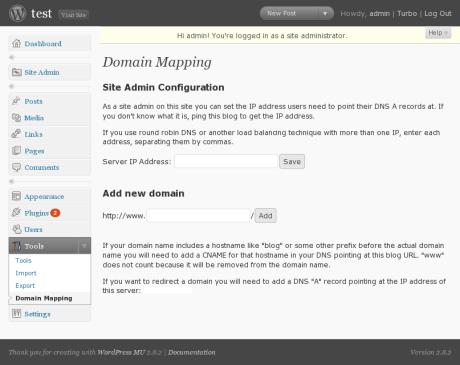
First, fill in the IP address of your site. You, as a site admin, will only have to do this once. We don’t have to worry about the rest of the instructions, because when we parked our domain on top of our WPMU install, that took care of it.
Fill in the domain name (domain2.com) and save. The screen will refresh and show the domain name as active on this blog.
Since we are still on the subdomain, visit domain2.com to confirm that everything is working as it should. Now any attempts to visit the original subdomain will be redirected to domain2.com. You can continue these steps for each domain you would like mapped to a corresponding sub-blog.
When you say: “First, get the WordPress MU Domain Mapping plugin. NOTE: this domain mapping plugin only works with subdomain installs.”
I pressume that means this will not work with http://wordpress.caryacademy.org/subsite.
It only works with http://subsite.caryacademy.org/, right?
Thanks, as always.
I have a headache just reading this
How to find a cheap webdesigner anywhere in USA…
Really nice article, i read entries blog afternoon then add it to my bookmarks and wait for your next article, i plan follow as you.
Thanks so much
decha kunla
Nice work,man…have submit to my Linkin account. More of my friends will see this post…great…They will interested it…Thanks.
i’ve got this installed and wp mu now reacts to domain2.com, however if i want to access the dashboard, it simply redirects to domain2.com/wp-login.php. I’ve also got BP installed and can see that this blog’s user is perfectly logged in, I just can’t access the dashboard – any suggestions?
finally got it working by completelye starting from the ground up again…
This is awesome. I’m wondering, though, if there is any sort of plugin (even if it’s premium) that automates it a little more? For example, if I as the admin must go into cPanel and park the domain, I might as well do all of the domain set up for the new blogs. Otherwise, they’re doing half the work and I’m doing half, and it’s likely to get messed up.
Is there any way to hide that plugin from the users, so that they cannot go in and modify the settings once they are set by me? I’m thinking that I would rather just have the whole thing blind to them – just give them a place to specify the domain they want, tell them the name servers and then do everything for them.
Hi,
I have a hosting account at godaddy – abc.com i added a new domain xyz.com and created folder – xyz
I installed wordpress in the xyz folder and pointed the domain to the same.
Now when i open xyz.com it is opening but shows loading from abc.com in the bottom plus when i open any other link it shows the root directory – abc.com/xyz
What are the steps to rectify this ?
Its hard to believe this has to be such a difficult task with WPMU – its such a commonly requested feature that it should just be built in by default.
reat Resource! I am adding your blog to my favorites, given my interest in finding domain names. One of the sites that helped me find great name suggestions was http://www.squadhelp.com. I got 400+ domain name suggestions in 2 days for just $50. They engage people across the world who submit ideas – and the best idea wins the award amount. It sure beats the time and energy I would have spent myself to come up with names. You might want to check them out
I get the Domain Mapping Configuration I put the information in. When I hit save, nothing happens.
I check the database and there was nothing entered in the wp_domain_mapping or wp_domain_mapping_logins tables.
howdy, many thanks.
Yeh I have same problem as dwheeler. Whan I click to add domain, I get note that domain has added, but it not and db table is empty.
Hi Andrea,
I have used WordPress MU for my multiple blosgs. Since all these blogs are private my users would need to enter http://www.qm.commons.com/wp-login/php This looks quite cumbersome for the users. Instead Can i use just “www.qm.aucommons.com” It would be easy for them. I have tried stealth login plugin but it does not work with MU 2.9.2. I need your help in fixing this !!!
NO
==============
define( ‘SUNRISE’, ‘on’ );
=============
on my wp-config.php……….
should I add?
Good blog post, I will be sure to save this post in my Del.icio.us account. Have a good day.
Hi, good post!
I have a problem installing addon domains in WordPress 3.0 beta 1 with this plugin.
I installed the plugin, enabled a network (based on folders), edited the wp-config and htaccess file, set the host IP in the mapping plugin.
But now I don’t see the part where I can map the domain names. I only can enter the server ip adress, or a cname. And i see 2 options about redirecting… I configured this too, properly.
It looks I am missing the last part, adding domains… I just see no input boxes or page where I can map/add domains to folder/the main blog.
What could there be wrong? Thank you in advance.
@Tia – automating the parking of domains is a server/dns issue. WP plguisn can’t do that part.
but yes, it’s possible. You need at least a vps though.
@John – log in to the admin area of the blog you want to map. Go to Tools -> Domain Mapping. you can’t map domains from the main blog with this plugin.
Also note the plugins DOES WORK with a subfolder install now. At the time I wrote the post (months ago) it did not. now it does.
if you’re looking for a paid version with more support, see:
http://wpmututorials.com/simple-multi-site-plugin-e-book/
I am using WordPress MU 2.9.2 with domain mapping plugiin.
but i am facing www striping problem. Can any one know that how i can solve it?
I was having problems getting the domain mapping plugin working on 3.0 beta2. My problem was not having
define( ‘SUNRISE’, ‘on’ );
before
require_once(ABSPATH . ‘wp-settings.php’);
The same problem was also stopping supercache as well, with define( ‘WP_CACHE’, true ); needing to be infront as well.
Hope this helps someone. (in retrospect the supercache troubleshooting guide does point out this potential error.
Sam + Andrea,
I’m also having difficulty getting it to run w/ 3.0
Are you going to update this and/or release a version for WP 3.0?
🙂 nmw
OMG / LOL!! 😀
I was copy / pasting the line with notepad / MS text editor — and so the quote marks weren’t copying correctly!
Now it seems to be fixed (hopefully, I just have to wait for cnames to resolve 😉
Not sure why, but domain mapping not showing up in the tools submenu of my 3.0 site…
Should I create an mu-plugins directory in wp-3.0?
@Brian This works with WP 3.0 you just have to do a little editing. First off, install the plugin like usual, I used the auto-installer.
– Add define( ‘SUNRISE’, ‘on’ ); to the wp-config.php file.
– Place sunrise.php in the wp-includes folder
– The plugin must then be activated for each individual site. A “network-activate” won’t work for some reason.
– Once activated, follow the general use instructions.
As a side note for those looking, if you are on a shared host, no only should your domains be pointed to the same IP (which should be default on a shared host), they must be directed to the root folder of your install location.
I hope this helps!
@Brian & @joshua WP 3.0 fully supports the use of the mu-plugins folder. You may need to create it. I recommend you place the plugin in there.
.-= Andrea_R´s last blog ..Testing the automatic upgrade to WordPress 3.0 =-.
Hi Andrea
Great Plug in Having a problem setting it up.
my main site is phpbbmodinstalls.com that’s my main account I have a sub directory bloginshere.com that the domain bloginsphere.com is pointing too. I’m tring to point n2rga.com into a blog setup inside of bloginsphere.com (n2rga.bloginsphere.com) when I go to n2rga.com it loads up my main site phpbbmodinstalls running regular wp 2.92
.-= Mitch´s last blog ..Tutorial 4 =-.
Forgot to mention that Im using WP 3.0rc1
.-= Mitch´s last blog ..Tutorial 4 =-.
I have installed this plugin and configured, but still can’t access the backend of the subdomain. How are you supposed to activate domain mapping on the subdomain if you can’t login to that subdomains backend?
Very confusing…
.-= Auz´s last blog ..The God of Beer =-.
Hi
I do not have the option of parking my domain in cPanel. I have access to using addon-domains and alias-domains.
Will either one of these do the same trick?
Cheers.
Andrea, this is a great post – but I’m having a little problem you might be able to help with.
After installing the plugin, I get the following message on the ‘Domain Mapping’ menu:
**
Warning! This plugin will only work if WordPress MU is installed in the root directory of your webserver. It is currently installed in ’/idx/’.
**
Is there a solution to this? Without moving the blog back to the root?
After many hours of pulling my hair out. This worked to get domain mapping working correct from SAM.
sam says:
May 9, 2010 at 7:41 amI was having problems getting the domain mapping plugin working on 3.0 beta2. My problem was not having
define( ‘SUNRISE’, ‘on’ );
before
require_once(ABSPATH . ‘wp-settings.php’);
Now to sort the missing www. problem 🙁
Your blog is very nice,thanks
YOUR FUCKING DIGG, GOOGLE BUZZ, TWITTER AND FACEBOOK BUTTONS ON THE LEFT OVERLAP WITH THE TEXT, AND I CANNOT READ THE POST. HOWTO REMOVE THAT SHIT?
Zoom out dumbass.
Hi,
I’ve written a really user friendly guide that takes you from Network creation to Domain mapping, with plenty of screenshots and code examples.
Have a look: http://catn.com/2010/08/09/enabling-wordpress-3-0-multi-site/
Zoom out dumbass.!
I’ve written a really user friendly guide that takes you from Network creation to Domain
Is there some way to run both subdomains AND folders on the same installation? I have subdomain set to false, using the domain mapping plugin, and none of the links work, they all default back to the root blog.
I obviously have done something, because I don’t see “domain mapping” in my Tools Section.
my initial site shows up fine, my second one shows up “as just text” not the templated version
i’m stumped now, so any advice you can give will be greatly appreciated
Hi,
We are actually facing exactly a similar problem, posted by uniq. Once we follow the steps to install the domain mapping plugin, it simply doesn’t load the dashboard. Starting from the ground up again is not an option for us as we just migrated to wp 3.0.1 and just cant understand the issue behind this.
Any suggestions????
Thanks…
I have successfully enabled multisite, installed MU Domain Mapping and added a second site mapped to a new domain. Everything is working fine, but I have a question about privacy:
My original site is my business site and the new site is entirely personal, and supposed to be anonymous. However, when you watch the browser’s (firefox) path to the new site while it loads (in the address bar at the bottom), you can see it hit the original site address just before the plugin maps it to the new site domain. Occasionally when the servers are busy you can see “waiting for originalsite.com” before it gets mapped.
Is there any way to keep visitors to the new site from ever seeing the address of the original site?
Just went through the whole process of creating a Network with 3.0.1 and when I added Domain Mapping and activated it for the network I get the following:
The domain mapping plugin only works if the site is installed in /. This is a limitation of how virtual servers work and is very difficult to work around.
Is there a work around for this?
Thanks,
Pat
@Pat – if your install is not in the root of the site, and is in a folder (with the folder name being in the URL) then, no.
No workaround.
.-= Andrea_R´s last blog ..Turn off Sitewide Tags on special blogs =-.
Dear,
I have done exactly the same as your instructions, but the domain mapped is returned “Apache is functioning normally”.
Please kindly let me know how to solve this issue?
Many thank
.-= Nguyen Khanh Lam´s last blog ..Hello world! =-.
You’re the first one to explain that in such clear & easy way
Thank you!
I installed wordpress in the xyz folder and pointed the domain to the same.
not working for me either…
I used a different tutorial (otto’s) where he has me set an A name instead of going the name server route… worked fine… BUT I can still hit the site from the subdomain url as well as the new mapped url, my settings are:
Remote Login
X Permanent redirect (better for your blogger’s pagerank)
X User domain mapping page
Redirect administration pages to site’s original domain
Disable primary domain check. Sites will not redirect to one domain name. May cause duplicate content issues.
do those look okay? not sure if this is an issue with the new version of wordpress or not?
figured it out, I’m going to post here to maybe save others countless hours of time… So if you’re a newbie to the network setup you might not understand what it means to ‘network activate a plugin’ when I went through that part of the tutorial I just activated the plugin on my main site’s plugins page (since it was there) and moved on. Instead of doing that you MUST active it for the network by going into the super admin area and then plugins…
brent
@
mimoYmima.com
2 potato
I was about to give up on the whole idea of one core set of wordpress files and managing multiple domains for clients when I came across this post.. many thanks for the run through.
I’m having problems accessing the second blog after domain mapping. I try to login or access through the admin dashboard but it keeps looping back to the login screen. Has anyone overcome this problem? http://diamantemerchant.co.nz thanks.
Andrea, I have the following situation.
Domain with hosting and setup network website (subfolder setup).
Other domain at another company, no hosting, only DNS tools and mailbox.
I want to use the other domain. I set up a new website in a subdomain of my main site. DNS forwards monas.nl to monas.gangleri.nl, but I want monas.nl to work like a website of its own, so monas.nl/posttitle rather than monas.gangleri.nl/postttitle.
I have tried everything, from 301 redirects to rewrite, editing httpd.conf to DNS settings, but all to no avail. As a trick to try mapping, I have turned the new website into a network and tried to use the plugin, but again, to no avail. Of course I have a network in a subdomain, does that mean mapping using the domain isn’t going to work? Also, I have no idea what I have to do in the DNS settings of either host.
The only thing left that I can think of is to make a new subsite on the main site and only map that one, but mapping doesn’t work with a subfolder network, or does it? Besides, I would prefer both websites to be separated since I allow registation on the new site, so I set it up with a different database and a different set of WP files.
Suggestions?
Many thanks for the blog it helped me a lot.
Hi Andrea
i guess there has been version updates since you published and some screen captures are not corresponding to the WP 3.4.2version and/or Multisite Domain Mapping plugin 0.5.4.2
concretely when you say “Look under the Tools menu for the Domain Mapping sub-menu. It’s pretty straightforward.”
on the Network Admin dashboard the side menu bar is: Sites/Users/themes/Plugins/settings/updates
but no “tools”
but under “Settings” there is /Network Settings/network setup/Domain Mapping/domains
I guess you refer to Domain Mapping > Server IP Address: & >Server CNAME domain:
and some Domain Options:
Remote Login
Permanent redirect (better for your blogger’s pagerank)
User domain mapping page
Redirect administration pages to site’s original domain (remote login disabled if this redirect is disabled)
Disable primary domain check. Sites will not redirect to one domain name. May cause duplicate content issues.